Your Team Doesn't Need More AI Tools. It Needs Fewer, Better Workflows.
The result is AI tool sprawl: a growing collection of disconnected AI applications that individually solve narrow tasks but collectively increase fragmentation, duplicate context and create…

Most companies did not plan their current AI stack.
It happened to them.
Someone started using ChatGPT.
Another department subscribed to a specialist writing platform.
Marketing added an AI design tool.
Sales adopted an AI prospecting product.
Customer success started experimenting with an AI meeting assistant.
The content team found an SEO platform with generative AI.
Operations bought an automation product.
Analytics adopted another copilot.
Before long, the organization had an impressive collection of AI tools.
It just didn't have an AI operating model.
This is becoming one of the less discussed problems of enterprise AI adoption.
Companies spent the last decade accumulating SaaS.
They may now spend the next few years accumulating AI.
The result is AI tool sprawl: a growing collection of disconnected AI applications that individually solve narrow tasks but collectively increase fragmentation, duplicate context and create additional work for the humans operating them.
The problem is not that the tools are bad.
Many are excellent.
The problem is that a collection of good tools does not automatically become a good system.
And in many organizations, the next productivity breakthrough will not come from adding another AI application.
It will come from removing workflows, consolidating context and connecting the tools that remain.
What Is AI Tool Sprawl?
AI tool sprawl occurs when an organization adopts multiple overlapping or disconnected AI applications without a coherent architecture for workflows, data, context, governance and ownership.
It is the AI-era version of SaaS sprawl.
A company might have separate tools for:
- research;
- writing;
- presentations;
- image generation;
- SEO;
- CRM intelligence;
- sales prospecting;
- analytics;
- meeting summaries;
- project management;
- customer support;
- automation;
- reporting;
- and knowledge management.
Each tool may save time within one task.
But employees then have to move information between them.
Copy the research into the writing tool.
Move the output into a document.
Transfer the document into project management.
Paste client feedback back into the AI.
Upload brand context again.
Export performance data.
Open another AI product to analyze it.
Then prepare a summary somewhere else.
The individual tasks became faster.
The workflow did not necessarily become better.
We Already Had This Problem Before Generative AI
The workplace was fragmented long before generative AI arrived.
Software digitized almost every business function, but it frequently did so by creating separate applications for separate categories of work.
Email.
Messaging.
Project management.
CRM.
Analytics.
Documents.
Spreadsheets.
Design.
Marketing automation.
Cloud storage.
Video meetings.
Knowledge management.
Employees became the integration layer.
They remembered where information lived.
They transferred context between systems.
They checked multiple applications for updates.
They reconciled conflicting versions.
They searched for documents.
They explained information from one platform to colleagues working inside another.
Research cited by Asana has described knowledge workers spending the majority of their time on “work about work”—activities such as coordinating, searching for information and switching between tools rather than performing skilled work itself.
Earlier Asana research also reported workers switching between 10 applications around 25 times per day.
AI arrived with the promise of reducing this friction.
But unless companies redesign the underlying system, AI can create another layer of it.
The New Stack Is Becoming Even More Fragmented
Imagine a marketing team five years ago.
Its core stack might have included:
a CRM;
an email platform;
analytics;
project management;
design software;
social-media management;
an SEO platform;
and a CMS.
Today, there may be an AI product layered on top of almost every one.
AI writing.
AI video.
AI research.
AI meeting notes.
AI sales intelligence.
AI campaign optimization.
AI analytics.
AI search.
AI customer insights.
AI image generation.
AI workflow tools.
AI agents.
AI copilots embedded inside the applications the organization already owns.
The natural response to every new capability is:
"We should try that."
But experimentation and operating architecture are two different things.
A company can run dozens of successful AI experiments while still failing to transform how work happens.
Atlassian's 2026 State of Teams research captures this distinction. Its survey found 89% of executives said AI increased speed, while only 6% were certain they could point to clear organization-wide AI ROI.
That gap is revealing.
Faster individuals do not automatically create a faster organization.
Tool Productivity vs Workflow Productivity
This distinction may become critical for AI strategy.
Consider two measurements:
Tool productivity:How much faster does AI make a particular activity?
Workflow productivity:How much faster and better does the entire business process become?
Suppose AI reduces the time required to create a campaign draft from four hours to one hour.
That sounds like a 75% productivity improvement.
But then the draft still needs to:
be transferred into another system;
checked against the brand guidelines;
reviewed by strategy;
sent to creative;
revised;
approved by the client;
uploaded into campaign software;
tracked;
analyzed;
and reported.
If the full campaign process takes two weeks, saving three hours on copywriting may barely affect the real bottleneck.
This is why AI ROI cannot be measured exclusively at the task level.
You need to understand the whole workflow.
The Problem Isn't Too Many Tools. It's Too Many Handoffs.
A company can successfully operate many tools if they form a coherent system.
It can also struggle with five tools if every process requires humans to manually transfer information between them.
The more useful metric is therefore not necessarily:
How many tools do we have?
It is:
How many times does a human have to manually move context between them?
Every handoff introduces friction.
It may require an employee to:
find information;
reformat it;
explain it;
verify it;
copy it;
update another application;
or decide what happens next.
That is why adding an AI application can paradoxically create more work.
The tool saves 15 minutes performing a task.
But employees spend 20 minutes feeding it context and transferring its output elsewhere.
The organization technically has more AI.
It does not have more intelligence.
Five Signs Your Company Has AI Tool Sprawl
1. Employees keep uploading the same context
If employees repeatedly provide brand guidelines, company descriptions, customer personas, product information or previous work to different AI tools, the organization does not have shared intelligence.
It has repeated prompting.
2. Several tools perform essentially the same job
One employee writes with one AI platform.
Another uses another.
A third uses the AI functionality built into the company's existing software.
There can be legitimate reasons for multiple models and applications.
But uncontrolled duplication creates cost, inconsistent outputs and governance problems.
3. People routinely copy AI outputs between applications
Research is generated in one tool.
Strategy happens in another.
Content in a third.
Approval in a fourth.
Reporting in a fifth.
If the employee is constantly copying and pasting, the human has become the API.
4. Nobody knows which AI system is authoritative
Which system contains the latest client context?
Which one has approved messaging?
Where are campaign learnings stored?
Which AI output should employees trust?
Without clear system boundaries, AI can amplify information inconsistency.
5. AI usage is increasing faster than business outcomes
Teams generate more content.
More reports.
More ideas.
More analysis.
More creative variations.
But revenue, cycle time, conversion, customer experience or margin barely moves.
This usually indicates that AI has accelerated activity rather than improved the operating system.
AI Can Create a New Kind of Busywork
Generative AI has dramatically lowered the cost of producing things.
That is powerful.
It also creates a new challenge.
When content becomes easier to generate, teams may create more content.
When research becomes easier, teams may produce more research.
When presentations become easier, teams may generate more presentations.
When ideas become cheap, teams may create hundreds of ideas.
But everything generated can create downstream work.
Someone may need to evaluate it.
Approve it.
Edit it.
Distribute it.
Monitor it.
Organize it.
AI can therefore remove production bottlenecks while creating review bottlenecks.
The solution cannot simply be more generation.
The system also needs prioritization.
Quality control.
Memory.
Decision rules.
Orchestration.
And sometimes the ability to decide that something does not need to be created at all.
Stop Buying AI Tools. Start Mapping Workflows.
When an executive asks:
"Which AI tools should our company use?"
I think there is a better question:
"Which workflows should operate differently because AI now exists?"
Take customer research.
Instead of deciding whether to buy a new research AI tool, map the complete workflow.
Where does customer information originate?
CRM?
Support conversations?
Sales calls?
Surveys?
Analytics?
Reviews?
Social conversations?
What happens to that information?
Who analyzes it?
Where are insights stored?
Who needs those insights later?
What decisions do they influence?
Once you understand the workflow, the technology requirements become clearer.
You may discover that you do not need another AI application.
You need a system capable of connecting information you already possess.
A Better Framework: Eliminate, Consolidate, Automate, Agentize
Before adding another AI product, evaluate the workflow using four steps.
Step 1: Eliminate
Ask whether the workflow should exist.
This sounds obvious.
It rarely happens.
Companies often automate reports nobody reads, meetings nobody needs and approval stages created years ago for reasons nobody remembers.
AI should not make unnecessary work faster.
It should help remove unnecessary work.
Step 2: Consolidate
Ask which tools, context and data can be unified.
Do three teams really need three AI writing products?
Does customer information need to exist separately across five systems?
Can employees access approved organizational knowledge through one shared layer?
Tool consolidation is not about forcing everything into a single application.
It is about reducing unnecessary fragmentation.
Step 3: Automate
Some processes are deterministic.
If X happens, do Y.
Those processes may be better served by conventional automation than by a generative AI agent.
Examples include:
creating a project when a contract is signed;
routing an approved file;
updating a CRM field;
triggering a predefined notification;
or moving standardized data between systems.
Do not use AI where simpler software is more reliable.
Step 4: Agentize
Some workflows require interpretation.
For example:
monitor campaign performance;
identify unusual changes;
investigate probable causes;
retrieve relevant historical context;
recommend an action;
and escalate the decision.
That is where AI agents become more interesting.
Instead of giving the employee another tool they need to operate, the system increasingly performs the workflow on their behalf.
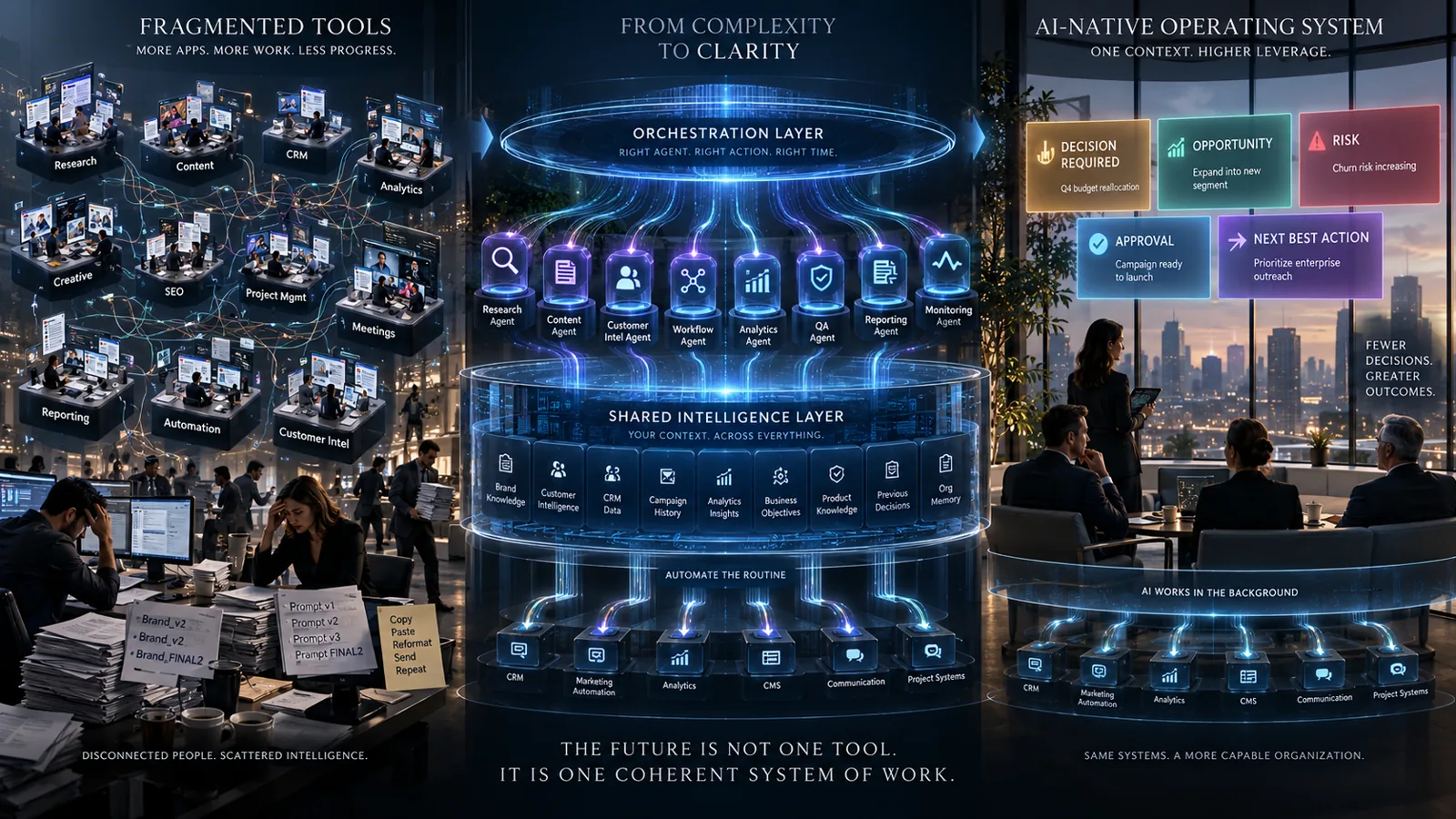
From Tools to an AI Operating System
This is the larger architectural shift.
Most companies currently think about AI in terms of applications.
The emerging model is to think about AI as part of an operating system for work.
That system might contain five layers.
1. Intelligence Layer
The shared context the organization operates from:
brand guidelines;
customer intelligence;
CRM data;
business goals;
campaign history;
documents;
product information;
performance data;
previous decisions;
and organizational knowledge.
2. Agent Layer
Specialized AI agents perform defined cognitive roles:
research;
customer intelligence;
content;
analytics;
reporting;
project coordination;
campaign monitoring;
quality assurance;
or competitive intelligence.
3. Orchestration Layer
The orchestration layer determines:
what happens next;
which agent or system should act;
what context is required;
what dependencies exist;
when human approval is necessary;
and whether a workflow is complete.
4. Execution Layer
Existing enterprise tools still matter.
CRM.
Marketing automation.
Email.
CMS.
Advertising platforms.
Analytics.
Project management.
AI does not need to replace all of them.
It can coordinate them.
5. Governance Layer
Permissions, security, approvals, logging, policy and human oversight determine what AI is allowed to do.
This architecture shifts AI from being another destination employees visit toward becoming intelligence that moves through existing work.
The Future Isn't Necessarily One Super App
There is an understandable temptation to conclude that every company should reduce itself to one software platform.
That is unlikely to be practical.
Specialized software exists because different problems require different capabilities.
Creative teams may still need professional design software.
Sales teams will still need CRM.
Finance will still need financial systems.
Marketers will still operate advertising and analytics platforms.
The goal is not one tool.
The goal is one coherent system of work.
Employees should not need to understand every integration running beneath it.
They should not repeatedly reconstruct organizational context.
They should not manually coordinate routine workflows simply because the company's software cannot communicate.
The number of visible interfaces may eventually decrease even as the number of underlying systems remains substantial.
AI and orchestration can increasingly become the connective layer.
Marketing Has an Especially Serious Tool Problem
Marketing may be one of the clearest examples.
A modern marketing organization can use software for:
CRM;
email;
content;
SEO;
advertising;
social media;
customer data;
attribution;
analytics;
creative;
project management;
personalization;
experimentation;
sales enablement;
web publishing;
and competitive intelligence.
AI is now entering virtually every category.
Atlassian's 2026 marketing research reported that 94% of surveyed marketers use AI at work, but only 3% of surveyed CMOs were certain they had organization-wide AI ROI.
Marketing leaders therefore face a different question from the one they faced two years ago.
It is no longer:
"How do we get our team to use AI?"
Increasingly, it is:
"How do we stop AI adoption from becoming another fragmented layer of the martech stack?"
The answer is likely orchestration.
What CMOs Should Do With Their AI Stack
Start with an inventory.
List every significant AI product the marketing organization uses.
For each one, identify:
Purpose: What specific job does it perform?
Users: Who actually uses it?
Context: What information must employees feed into it?
Input: Where does that information originate?
Output: Where does the result go?
Overlap: Which other systems perform similar functions?
Integration: Does it participate in a workflow or operate independently?
ROI: What business outcome has measurably improved?
Governance: What company or customer information can it access?
Then assign the tool to one of four categories:
Keep: Strategically important and clearly valuable.
Integrate: Valuable but too disconnected.
Consolidate: Duplicates another capability.
Remove: Limited use or unclear business value.
Do this periodically.
AI software is evolving too quickly for technology portfolios to remain static.
Measure Workflow ROI, Not AI Adoption
AI adoption is a weak success metric.
Imagine a company reports:
"92% of our marketing employees now use AI."
Interesting.
But what changed?
Are campaigns faster?
Did acquisition costs fall?
Did conversion improve?
Did content quality rise?
Are marketers spending more time on strategy?
Did reporting time decrease?
Did customer response times improve?
Did the company reduce duplicated work?
Did marketing produce more revenue per employee?
Those are operating outcomes.
AI usage is merely an input.
The strongest AI organizations will eventually stop celebrating how many employees use AI.
AI will simply become part of how work operates.
Fewer Tools Can Produce More AI
This sounds contradictory.
But imagine two companies.
Company A has 30 AI applications.
Every employee chooses their favorites.
Information is scattered.
Prompts are repeated.
Outputs need to be moved manually.
No system remembers what other systems did.
Employees remain responsible for coordination.
Company B visibly uses five major platforms.
Underneath them sits shared organizational context, integrated automation and several specialized agents.
The agents can retrieve information and operate approved systems.
Workflows span applications automatically.
Humans intervene when judgment or approval is required.
Which company is more AI-native?
Probably Company B.
AI maturity should not be measured by the size of the tool stack.
It should be measured by how little unnecessary coordination humans have to perform.
Frequently asked questions
What is AI tool sprawl?
AI tool sprawl is the uncontrolled accumulation of overlapping or disconnected AI applications across an organization. It often results in duplicated capabilities, fragmented context, additional software costs, governance challenges and extra human coordination.
Can having too many AI tools reduce productivity?
Yes. Individual AI tools can improve task productivity while the overall workflow becomes more complex. If employees constantly switch tools, re-enter context or transfer outputs manually, some of the productivity gains can disappear.
How many AI tools should a company use?
There is no optimal number. The more useful question is whether each tool has a defined role inside a coherent workflow. Ten well-integrated applications may perform better than three poorly connected ones.
What is the difference between an AI tool and an AI workflow?
An AI tool performs a particular capability when someone uses it. An AI workflow connects multiple steps, information sources, systems and decisions to achieve an outcome. AI tools can exist inside AI workflows.
Should businesses consolidate their AI tools?
Businesses should consolidate tools when capabilities significantly overlap, adoption is low, information is unnecessarily fragmented or the cost of integration exceeds the additional value of maintaining separate platforms.
What is the difference between AI agents and AI tools?
An AI tool generally waits for a user to interact with it. An AI agent can be designed to pursue a defined objective, retrieve context, reason about what needs to happen, use approved tools and escalate decisions to humans when necessary.
What should a company do before buying another AI product?
Map the workflow first. Identify the problem, bottleneck, required context, existing systems, desired business outcome and whether current technology could already solve the issue through integration or automation.